
In un'infrastruttura globale, il primo secondo di una visita di un utente è fondamentale. Se un utente tedesco atterra sulla tua homepage in inglese, sperimenta attrito. Il MultiLipi's Redirector Lingua Visitatore elimina questo agendo come un controller del traffico intelligente. Ispeziona le intestazioni della richiesta in entrata e instrada istantaneamente il visitatore alla versione localizzata del tuo sito che corrisponde alle preferenze del suo browser.
Questa guida descrive nel dettaglio protocollo di configurazione e gli algoritmi di routing utilizzati per gestire questo flusso.
1. L'architettura di rilevamento
Come il motore sa chi sta visitando.
Il redirector opera su un flusso logico rigoroso basato sull' Accept-Language intestazione HTTP inviata da ogni browser web moderno.
Interrogazione:
Un visitatore atterra su tuosito.com.
Analisi:
Il motore legge l'elenco delle priorità della lingua del browser (ad es. fr-FR, en-US).
Corrispondenza:
Controlla le lingue attive del tuo progetto.
Corrispondenza Trovata:
L'utente viene immediatamente reindirizzato 302 a /fr/.
Nessuna Corrispondenza:
L'utente rimane sulla Lingua Predefinita (Sorgente).
2. Protocollo di configurazione
Abilita questo livello di routing automatizzato direttamente dalle impostazioni del tuo progetto.
Passaggio 1: Accedi alla Dashboard del Progetto
Accedi al tuo Dashboard MultiLipi.
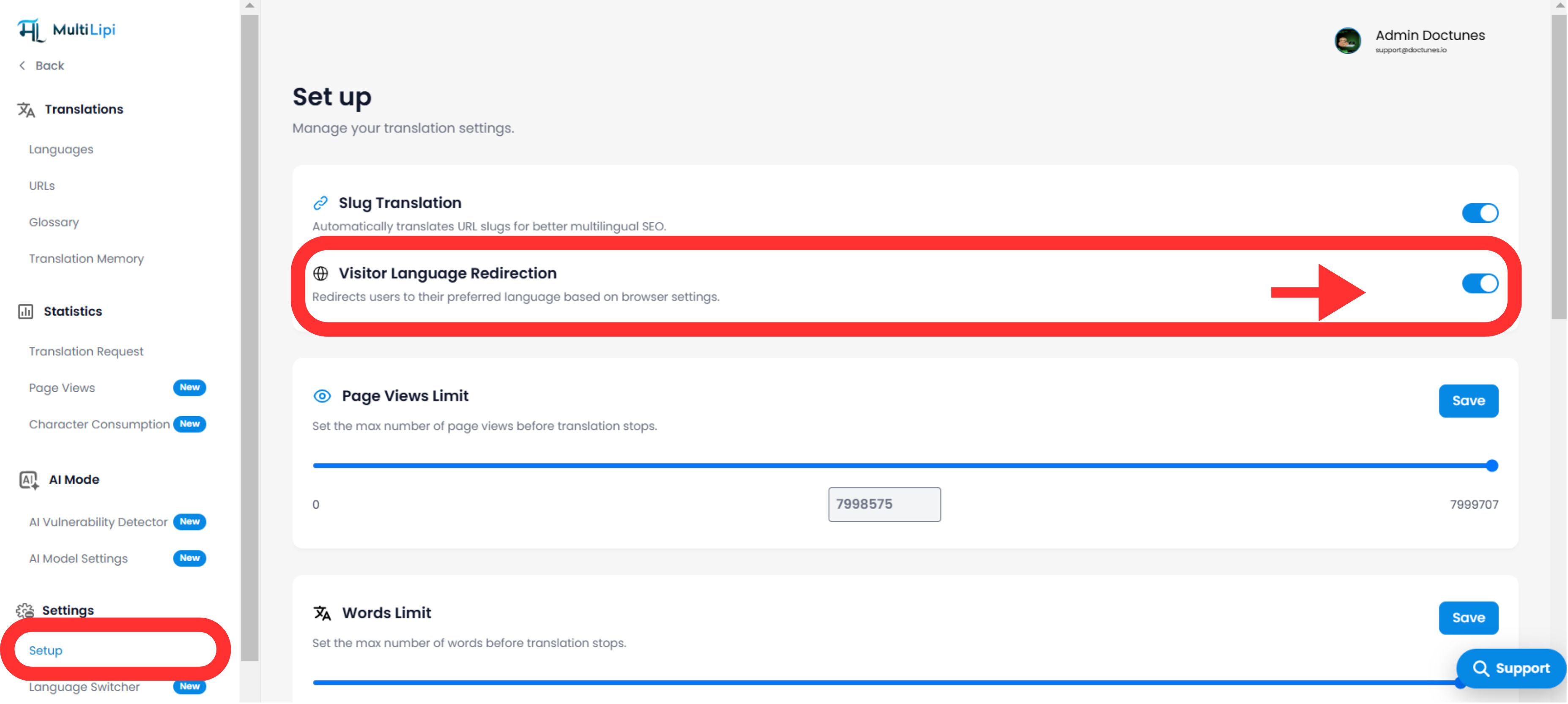
Passaggio 2: Naviga alla configurazione
- •Vai a Impostazioni nella barra laterale sinistra.
- •Seleziona Configurazione dal sottomenu.
Passaggio 3: Attiva il Modulo
- •Scorri verso il basso per trovare il Redirector Lingua Visitatore blocco funzionalità.
- •Azione: Attiva l'interruttore su
ACCESO. - •Stato: Attivo: Il motore di routing inizierà immediatamente a filtrare e reindirizzare il nuovo traffico.
Motore di routing attivato
3. Il livello di persistenza (override del cookie)
Bilanciare l'automazione con il controllo dell'utente.
Una paura comune con i reindirizzamenti automatici è intrappolare gli utenti nella lingua sbagliata (ad es. un inglese a Parigi che utilizza un computer francese). MultiLipi risolve questo problema con un Cookie di Priorità.
La logica:
Se un utente viene reindirizzato automaticamente al francese ma utilizza manualmente il selettore della lingua per tornare all'inglese, impostiamo un Cookie di persistenza.
Il Risultato:
Alla loro prossima visita, il sistema rispetta la sua scelta manuale sopra l'impostazione del loro browser. L'utente è sempre sotto controllo.
4. Armonia SEO e Indicizzazione
Proteggere il tuo crawl budget.
Questa funzionalità è progettata per essere Amichevole per i Motori di Ricerca.
Compatibilità Hreflang:
Funziona insieme al tuo hreflang tag per garantire che Google comprenda la relazione tra le tue pagine.
Comportamento del Bot:
La maggior parte dei bot di ricerca esegue la scansione senza uno specifico Accept-Language intestazioni o vengono trattati come "Neutrali", garantendo che possano comunque accedere e indicizzare i tuoi contenuti predefiniti senza rimanere bloccati in un ciclo di reindirizzamento.
5. Protocollo di verifica
Come testare il percorso.
Per verificare che il reindirizzatore funzioni:
Configura Browser:
Vai nelle impostazioni del tuo browser (Chrome/Firefox) e cambia la tua lingua preferita in una che supporti (es. Francese).
Cancella i cookie:
Apri una finestra di Navigazione Inognito/Privata (per aggirare il Cookie di Persistenza menzionato nella sezione 3).
Visita:
Digita il tuo URL principale (iltuosito.com).
Osserva:
Dovresti essere automaticamente reindirizzato a tuosito.com/fr/.
Indicatore di successo:
Se l'URL nel tuo browser cambia per includere il codice della lingua di destinazione (ad es. /fr/), il Reindirizzamento della Lingua del Visitatore è funziona perfettamente.