

Localizza i tuoi permalink per la massima visibilità organica e CTR.
In SEO Internazionale, la struttura del tuo URL è il primo segnale che un utente vede nei risultati di ricerca. Se il tuo contenuto è in spagnolo ma il tuo URL rimane in inglese (ad esempio, /es/precios), crei una "Discrepanza Lingua" che abbassa la fiducia e il Click-Through Rate (CTR).
Il Motore di Traduzione Slug elimina questo attrito. Traduce automaticamente i segmenti del percorso dell'URL (slug) nella lingua di destinazione, garantendo che la tua architettura di routing corrisponda ai tuoi contenuti.
- Inglese:
example.com/pricing - Spagnolo:
example.com/es/precios - Tedesco:
example.com/de/preise
1. Il Vantaggio SEO
Perché localizzare il tuo livello di routing?
Pertinenza delle Parole Chiave
I motori di ricerca evidenziano le parole chiave nell'URL. La traduzione dello slug inserisce le tue parole chiave di destinazione (ad esempio, "precios") direttamente nel link, migliorando il posizionamento per le query locali.
Fluidità Cognitiva
Un URL completamente localizzato sembra nativo. Segnala all'utente, "Questa pagina è in realtà per me," piuttosto che "Questa è solo una copia tradotta automaticamente."
Coerenza della Struttura
Allinea i tuoi breadcrumb e l'architettura del sito, creando una gerarchia logica per i crawler.
2. Protocollo di configurazione
Attivazione del motore di routing.
Per abilitare la traduzione automatica dei percorsi, segui questi passaggi nel tuo centro di comando:
Accedi al Contesto del Progetto
- Accedi al tuo Dashboard MultiLipi.
- Naviga su Progetti nella barra laterale sinistra per visualizzare le tue integrazioni attive.
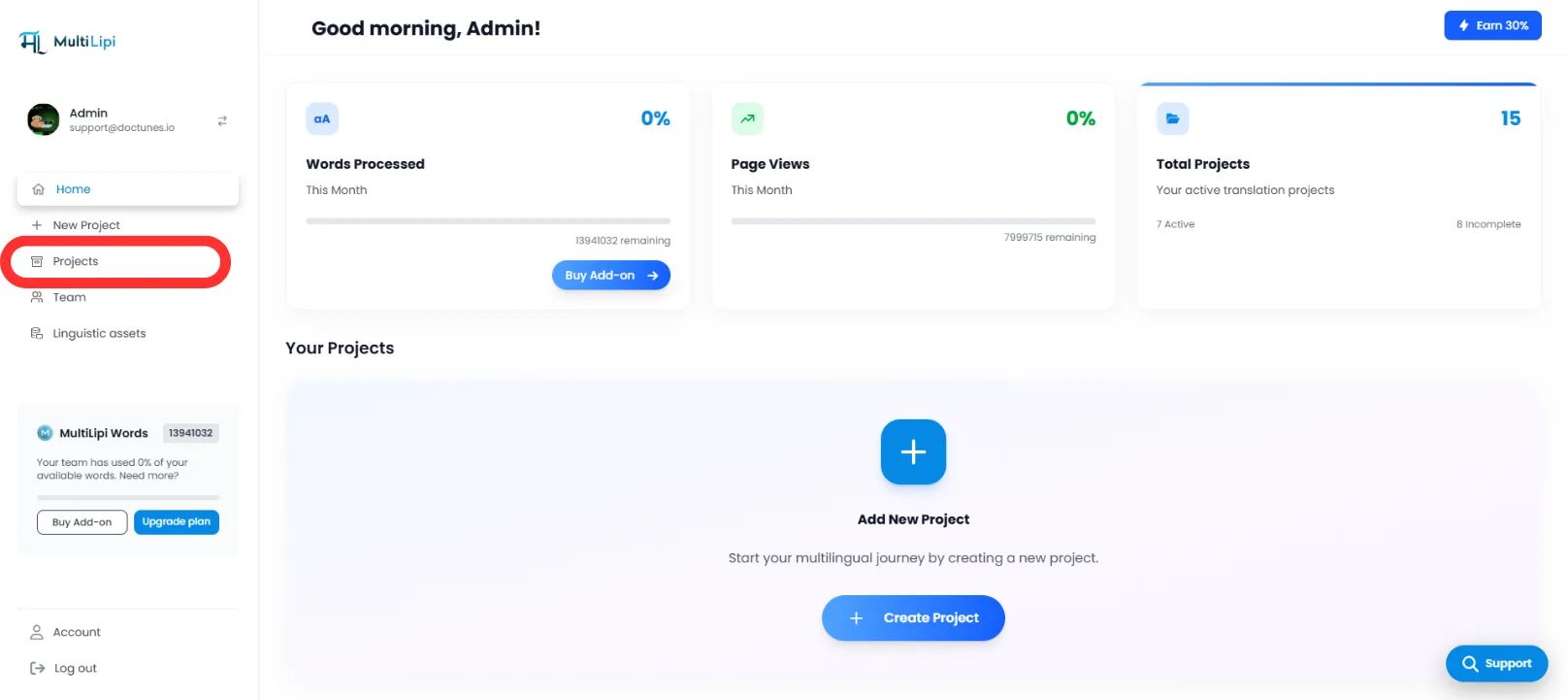
Seleziona Architettura di Destinazione
- Individua il progetto/sito web specifico che desideri configurare.
- Clicca sul Scheda Progetto desiderata per accedere alle sue impostazioni.
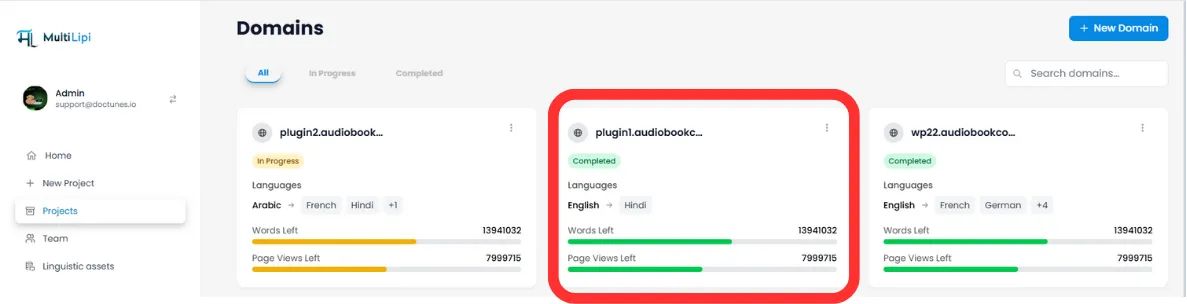
Accedi alla configurazione
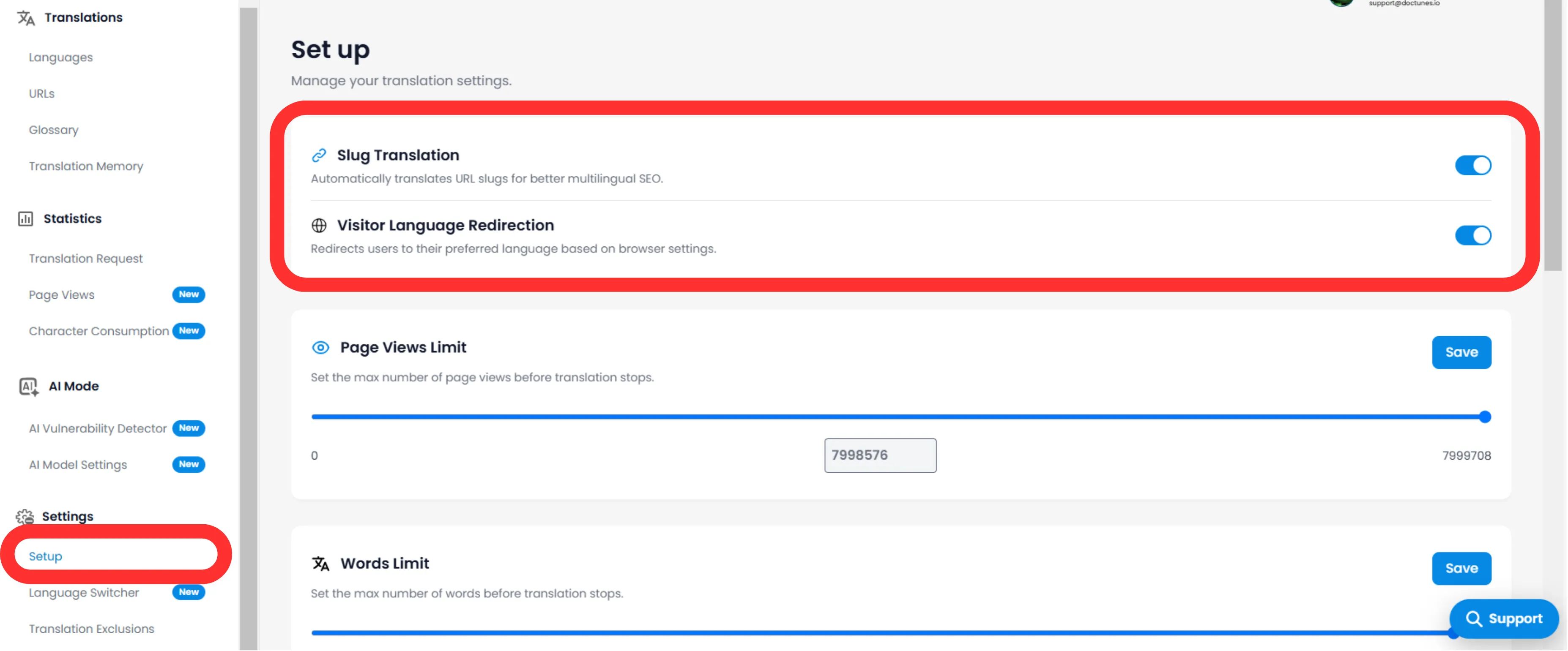
- Nel sottomenu del progetto (lato sinistro), clicca su Impostazioni.
- Seleziona Configurazione.
Attiva/Disattiva Slug Engine
- Scorri fino al Traduzione Slug sezione.
- Azione: Attiva l'interruttore su ON (Blu).
- Azione del sistema: Il motore intercetterà le richieste URL e servirà lo slug localizzato per tutte le lingue di destinazione.
3. Comportamento tecnico
Come gestisce i reindirizzamenti.
Una volta abilitato, il sistema gestisce automaticamente la mappatura.
Reindirizzamenti 301
Se un utente (o bot) tenta di accedere al vecchio URL non tradotto (/es/precios), MultiLipi li reindirizza automaticamente 301 al nuovo URL ottimizzato (/es/precios). Questo preserva la tua link equity (SEO juice).
Iniezione Sitemap
Le tue sitemap XML si aggiorneranno automaticamente per elencare questi nuovi URL localizzati affinché Googlebot possa scansionarli.
🌐 Localizzazione Automatica URL: Traducendo i tuoi slug URL, crei un'esperienza internazionale senza interruzioni che migliora sia il posizionamento SEO che la fiducia degli utenti in tutti i mercati di destinazione.