
La vera localizzazione va oltre il corpo della pagina; include la struttura dell'URL stessa. "Slug Translation" converte il percorso semantico dei tuoi link (ad esempio, /about-us(ad esempio, /a-propos o /sobre-nosotros). Questo è fondamentale per SEO multilingue, poiché i motori di ricerca danno priorità agli URL che corrispondono all'intento di ricerca dell'utente nella sua lingua madre.
Questa guida descrive nel dettaglio protocollo di configurazione, gestione delle collisioni e logica di routing per la localizzazione approfondita degli URL.
1. Protocollo di Abilitazione
Attiva la localizzazione profonda.
Per impostazione predefinita, MultiLipi tenta di tradurre gli slug per massimizzare la SEO. Tuttavia, dovresti verifica questa configurazione nelle impostazioni del tuo progetto.
Passaggio 1: Accedi alle Impostazioni del Progetto
- •Accedi al tuo Dashboard MultiLipi.
- •Naviga su Impostazioni nella barra laterale sinistra.
- •Seleziona Impostazioni Progetto dal sottomenu.
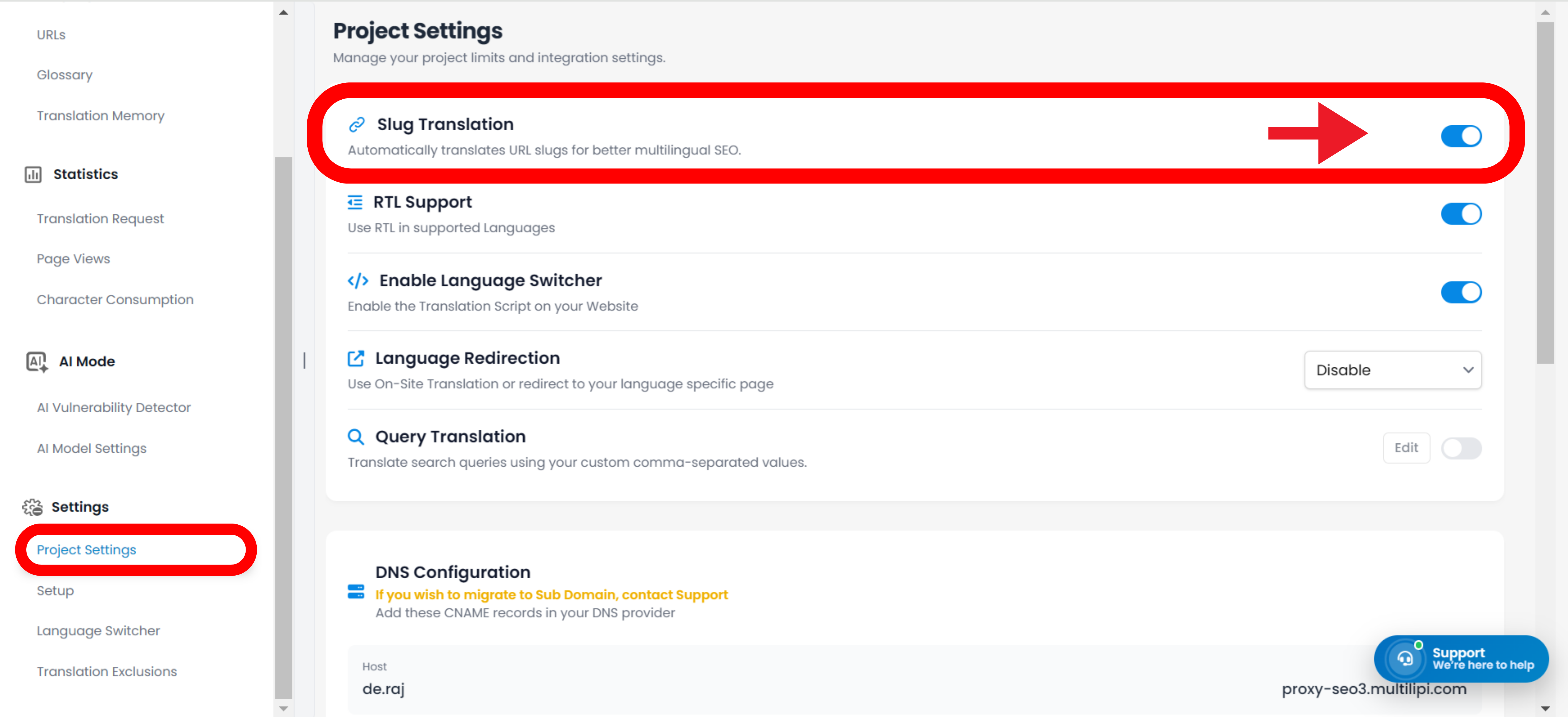
Passaggio 2: Attiva il Modulo
- •Scorri verso il basso fino al Traduzione Slug sezione.
- •Azione: Assicurati che l'interruttore sia impostato su
ACCESO(Posizione blu).
Il motore genererà automaticamente URL localizzati per tutte le pagine nuove ed esistenti (ad esempio, /contact → /contacto).
Gli URL rimarranno in inglese, anche sulle pagine tradotte (ad esempio, /es/contatti).
2. Aggiornamenti automatici della topologia (riscrittura dei link)
Come il sistema gestisce la navigazione interna.
Una delle funzionalità più potenti del motore di traduzione degli slug è Riscrittura Automatica dei Link.
Il meccanismo:
Quando uno slug viene tradotto (ad es. /shop → /boutique), MultiLipi analizza le tue pagine localizzate per i link interni che puntano al vecchio URL.
L'Azione:
Riscrive automaticamente i tag <a href="..."> nell'HTML per puntare allo slug localizzato e nuovo.
Il Risultato:
Gli utenti rimangono all'interno dell'ecosistema localizzato. Un utente francese che fa clic su "Shop" viene indirizzato a /boutique, non a /shop.
3. Gestione: Override Manuale
Controllo di precisione per le parole chiave dell'URL.
Mentre la nostra IA genera automaticamente slug ottimizzati per la SEO, potresti voler modificare manualmente un URL per puntare a parole chiave locali specifiche o per corrispondere a una campagna di marketing.
- •Naviga al Traduzioni sezione della tua dashboard.
- •Individua la riga della pagina specifica che desideri modificare.
- •Fai clic Modifica Slug accanto all'anteprima dell'URL.
- •Input: Inserisci la stringa preferita (ad esempio, cambia
/prodottia/boutique). - •Commit: Fai clic
Salva Modifiche.
Nota: Il sistema aggiornerà immediatamente la mappa di routing interna per servire i contenuti a questo nuovo indirizzo.
4. Protocollo di gestione delle collisioni
Prevenire conflitti di routing.
In alcune lingue, due parole inglesi diverse potrebbero tradursi nella stessa parola straniera, creando un Collisione di Slug.
Scenario:
Hai /store (vendita al dettaglio) e /shop (verbo). Entrambi potrebbero essere tradotti automaticamente in /boutique in francese.
Il Rischio:
URL duplicati confondono i motori di ricerca e causano errori di routing.
La Soluzione:
Usa il Override Manuale (Passaggio 3) per differenziarli (ad esempio, mantieni /boutique per il negozio e usa /acheter per il verbo).
5. Strategia di reindirizzamento legacy (301)
Gestire le modifiche agli URL live.
Se decidi di modificare uno slug tradotto dopo che Google lo ha già indicizzato (ad esempio, modificando /fr/a-propos a /fr/notre-histoire), devi assicurarti che gli utenti non incontrino un errore 404.
Migliore Pratica:
Imposta un Reindirizzamento 301 nel tuo CMS sottostante (WordPress/Shopify/Webflow).
Flusso di lavoro:
Reindirizza il vecchio pattern di URL tradotto al nuovo pattern di URL tradotto per preservare la tua SEO "link juice."
6. Integrazione universale CMS
Routing indipendente dalla piattaforma.
Poiché MultiLipi opera come un livello proxy, la traduzione degli slug funziona indipendentemente dal tuo backend.
Piattaforme Supportate:
WordPress, Shopify, Webflow, Wix, Squarespace e HTML personalizzato.
Nessuna Configurazione Backend:
Non è necessario creare queste pagine nel tuo CMS. MultiLipi mappa virtualmente la richiesta /fr/boutique al tuo originale /shop pagina mentre serve il contenuto tradotto.