
Controlla la tua narrazione AI
Nell'era del Ottimizzazione del Motore Generativo (GEO), il Titolo e la Descrizione della tua pagina sono molto più che semplici link blu su Google; sono i "Vettori di Contesto" primari per i modelli di IA. Sebbene MultiLipi traduca automaticamente queste risorse, il Gestore Schema e llms.txt ti offre un controllo granulare per sovrascriverli, garantendo che la narrazione del tuo marchio sia coerente in ogni lingua.
Cosa controllerai:
Accedi all'Hub IA
- 1Accedi al tuo Dashboard MultiLipi.
- 2Nella barra laterale sinistra sotto OTTIMIZZAZIONE LLM sezione, fai clic su Schema & llms.txt.
- 3Controllo visivo: Vedrai una dashboard che elenca tutte le tue coppie di lingue attive (ad es. Inglese → Italiano, Inglese → Tedesco).
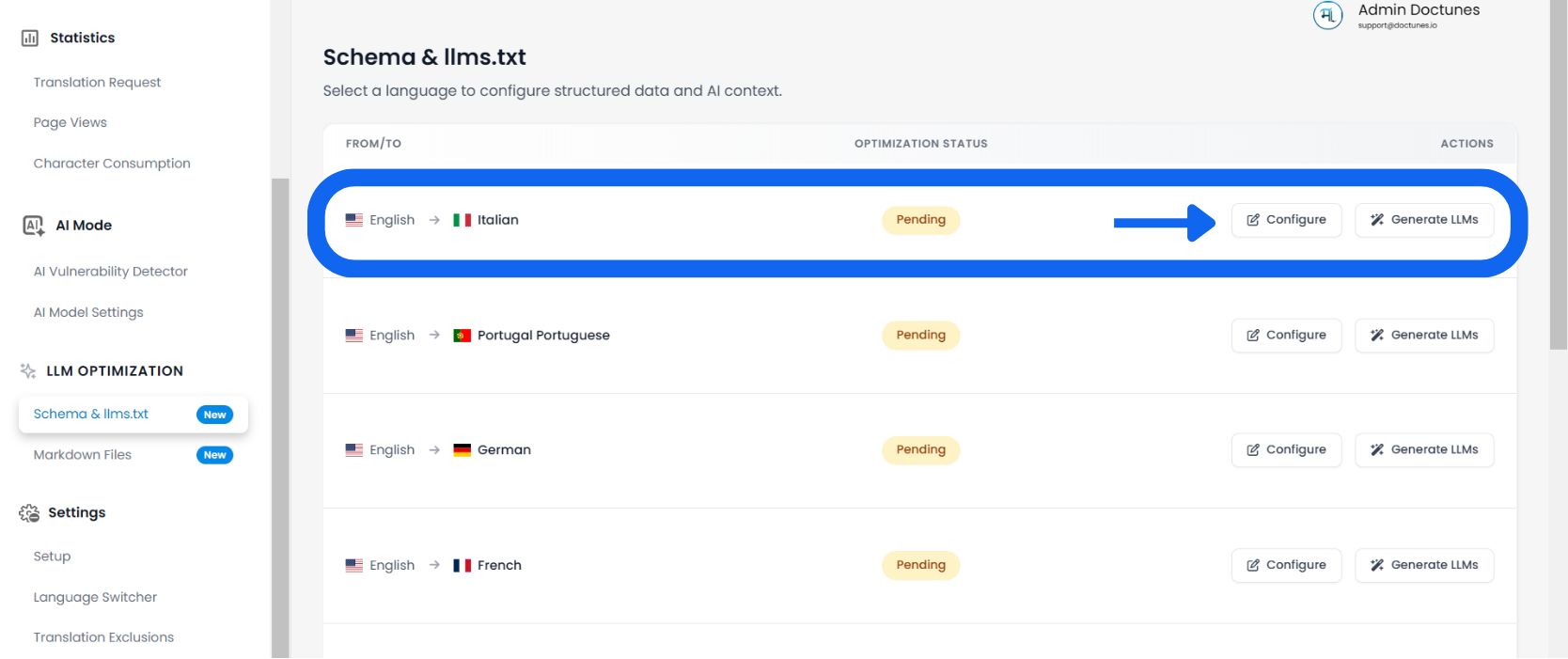
Seleziona una lingua di destinazione
Rivedi la Stato di ottimizzazione colonna (ad es. "1% Ottimizzato" o "In attesa") per vedere quali lingue richiedono attenzione.
Audit dei metadati della pagina
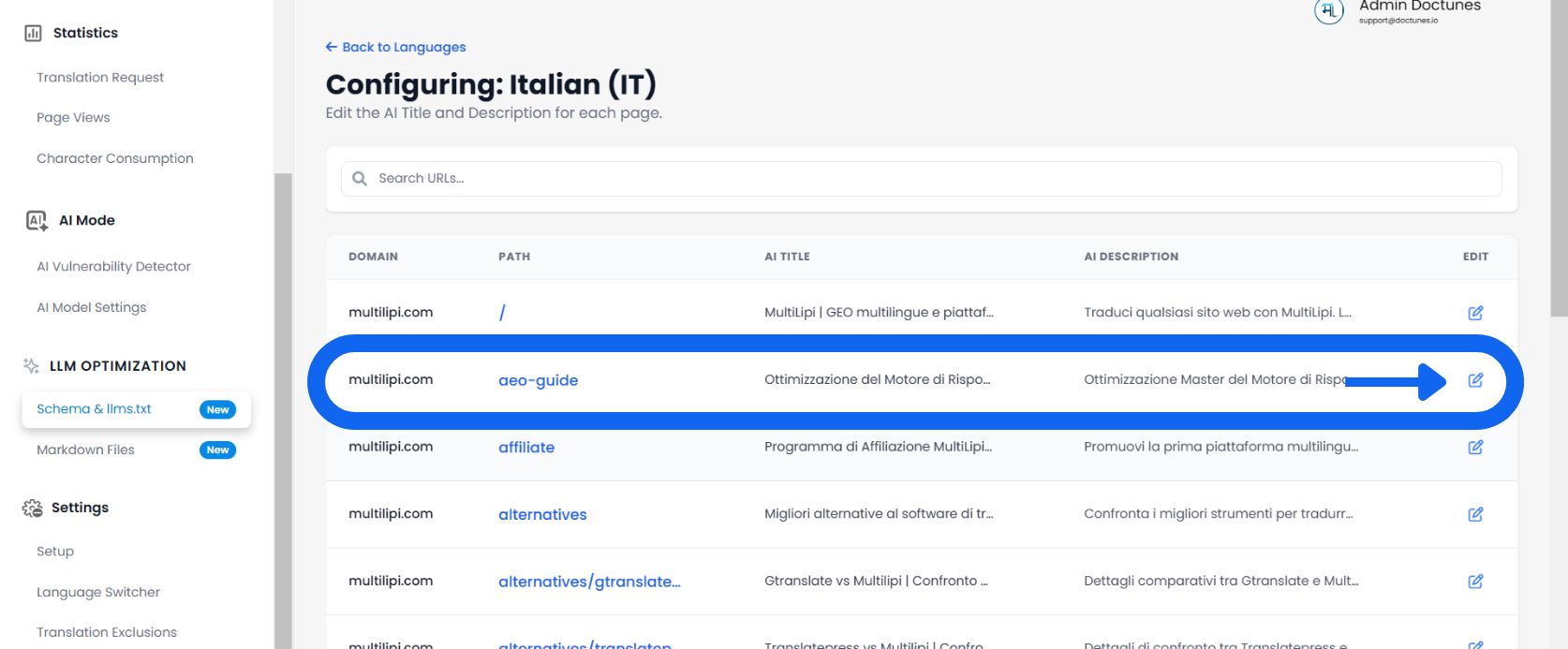
Il sistema carica un elenco granulare di ogni URL scoperto sul tuo sito per quella lingua.
Rivedi le colonne:
Lo slug specifico della pagina (ad es. /aeo-guide).
Il titolo del tag localizzato corrente servito ai bot.
Il riepilogo localizzato utilizzato per l'indicizzazione tramite IA.
Modifica e sovrascrivi
✏️ Se la traduzione generata automaticamente non coglie le sfumature del tuo marchio, sovrascrivila manualmente.
- Fai clic su Modifica:Seleziona il Icona matita accanto a qualsiasi Titolo o Descrizione.
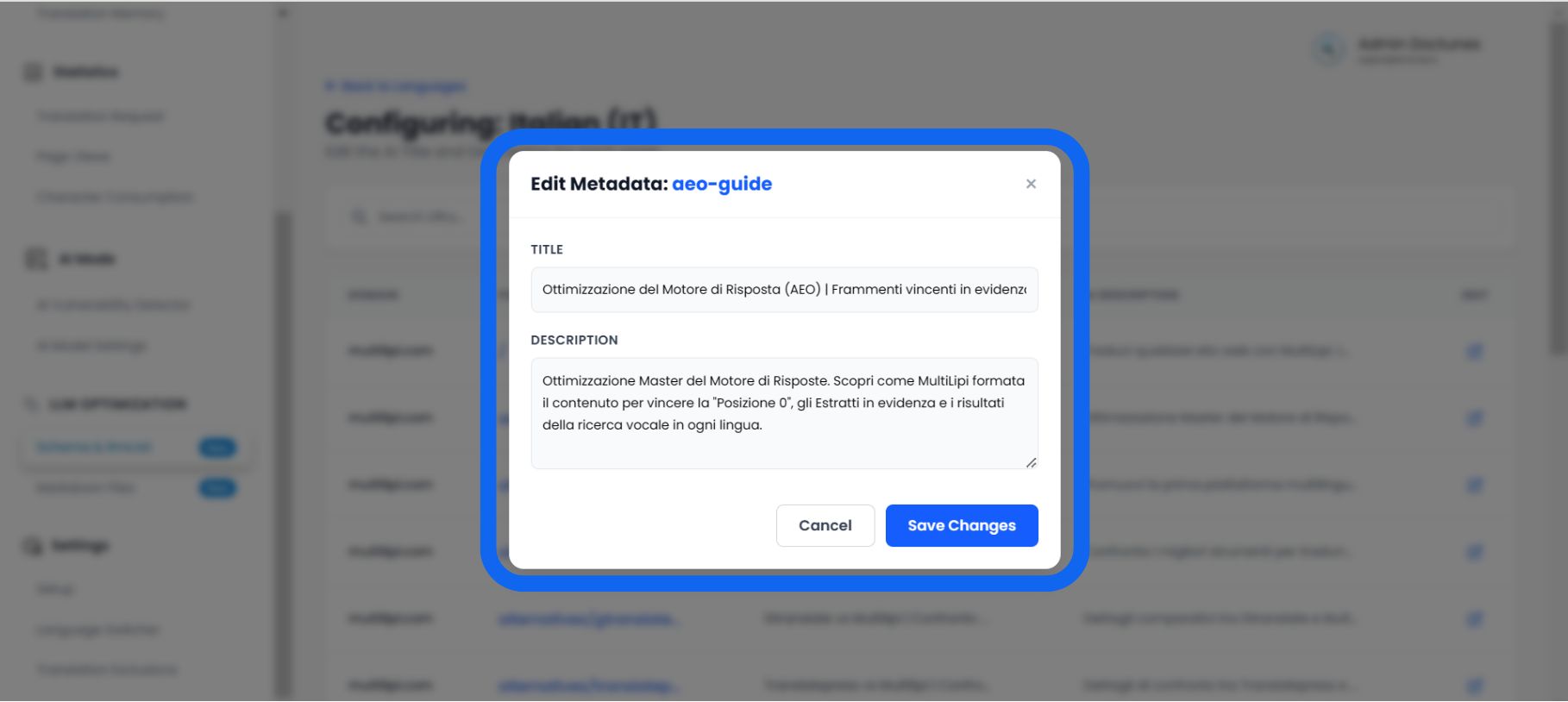
- Modale dell'Editor:Un popup intitolato "Modifica i metadati dello schema" apparirà.
- Inserisci Nuovi Dati:
• Titolo dello schema: Inserisci un titolo localizzato e ricco di parole chiave.
• Descrizione Schema: Scrivi un riassunto strutturato (circa 160 caratteri) che risponda direttamente all'intento dell'utente.
- Salva:Fai clic Salva Modifiche.
Risultato: Il sistema aggiorna immediatamente il tuollms.txtfeed e markup JSON-LD con questi nuovi dati curati.
Perché la curatela manuale è importante
🎯 Non limitarti a tradurre; ottimizza.
Sebbene la traduzione automatica sia accurata al 95%, il Gestore di Schema ti permette di perfezionare quel 5% finale che guida la conversione.
La "Correzione allucinazioni"
⚡ Impedisci all'IA di mentire sul tuo prodotto.
I modelli di intelligenza artificiale (come ChatGPT) spesso "allucinano" fatti quando non dispongono di dati chiari.
⚠️ Il Rischio
Se la tua descrizione tradotta automaticamente è vaga, un'IA potrebbe indovinare erroneamente i tuoi prezzi o le tue funzionalità quando risponde alla domanda di un utente.
✅ La Soluzione
Modificando manualmente il Descrizione dello schema in questo strumento, fornisci un riepilogo "Fatto Concreto". Ciò costringe l'IA a utilizzare il tuo definizione scritta come verità di riferimento, riducendo significativamente la probabilità di disinformazione nelle risposte generate dall'intelligenza artificiale.