
Nelle distribuzioni Web su larga scala, le strutture degli URL cambiano spesso. Potresti decidere di rinominare l'intero /blog/ directory to /news/ su 500 pagine tradotte. Farlo manualmente è un suicidio operativo. La funzione Modifica slug in blocco il motore consente di eseguire operazioni di "Trova e sostituisci" nell'intera sitemap localizzata in pochi secondi, garantendo che la strategia SEO rimanga flessibile.
Questa guida descrive in dettaglio il protocollo per l'esecuzione di questi aggiornamenti di routing in batch.
1. Protocollo di navigazione
Accesso alla tabella di routing.
Per avviare un'operazione in blocco, devi prima accedere al registro di tutti i percorsi tradotti.
Passaggio 1: Accedi al Contesto del Progetto
Accedi alla tua Dashboard MultiLipi.
Seleziona il progetto specifico che desideri gestire.
Passaggio 2: Accedi al registro delle traduzioni
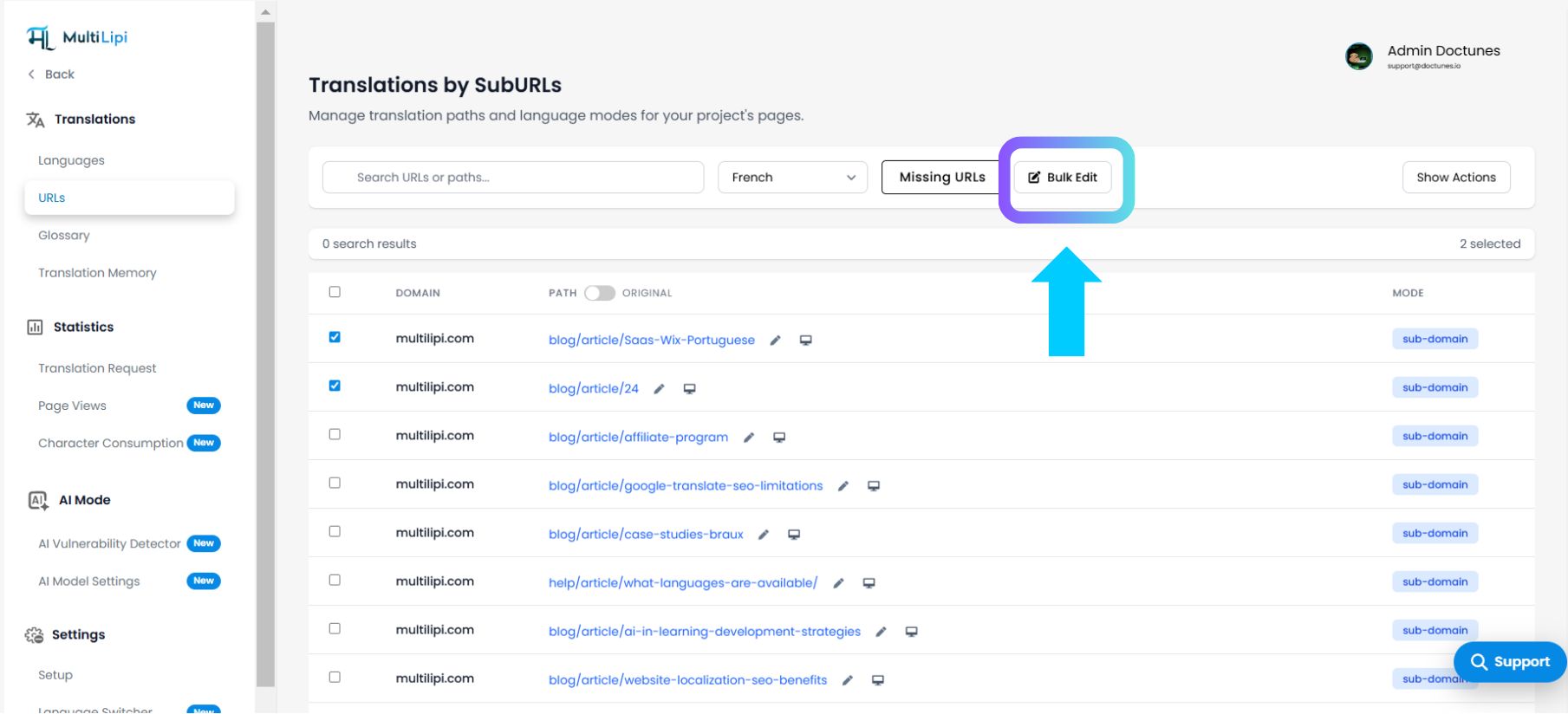
Nella navigazione del progetto, clicca su Traduzioni.
Dal sottomenu, seleziona URL.
Contesto: Questa vista elenca ogni sub-URL attivo nel tuo progetto, insieme al suo attuale stato dello slug tradotto.
2. Il protocollo batch
Esecuzione della logica Trova e sostituisci.
Passaggio 1: Strategia di selezione
Selezione manuale: Seleziona le caselle accanto a URL specifici per indirizzare un sottoinsieme (ad es. solo le pagine dei prodotti).
Selezione globale: Puoi scegliere di applicare le modifiche all'intero elenco nel passaggio successivo.
Passaggio 2: Inizializza l'operazione
Fai clic sul Modifica massiva pulsante situato nell'angolo in alto a destra della tabella.
Azione del sistema: Questo attiva la finestra modale "Trova e sostituisci".
Passaggio 3: Definisci il pattern
Trova: Inserisci la stringa di testo che desideri rimuovere (ad es., articolo).
Sostituisci: Inserisci la nuova stringa di testo (es., articoli).
Passaggio 4: Definire l'ambito
Scegli l'ambito di applicazione:
Solo elementi selezionati: Applica le modifiche solo alle righe selezionate nel Passaggio 1.
Tutti gli elementi: Applica la corrispondenza dei pattern a ogni URL nell'elenco (ad es. tutte le 677 pagine).
Passaggio 5: Conferma
Fai clic sul Sostituisci pulsante.
Risultato: Il motore elabora il batch istantaneamente. La mappa di routing interna viene aggiornata e i nuovi slug vengono pubblicati immediatamente.
3. Casi d'uso strategici
Quando utilizzare le operazioni in batch.
Spostamenti di tassonomia: Se il tuo team di marketing modifica la categoria "Maglioni" in "Maglieria", puoi aggiornare lo slug per tutte le 50 pagine di prodotti in spagnolo (/sueteres/ → /tejidos/) in un clic.
Standardizzazione: Risoluzione di convenzioni di denominazione incoerenti (ad es. garantire che tutti i post del blog inizino con /blog- anziché solo /).
Correzione degli errori: Correzione rapida di un refuso propagato su più URL durante un batch di traduzione IA.
4. Protocollo post-distribuzione
Aggiornamento dell'indice di ricerca.
La modifica di un URL (slug) è un evento SEO significativo. Dopo aver eseguito una modifica massiva:
Rigenera la Sitemap: Assicurati che la tua sitemap XML rifletta i nuovi percorsi.
Invia a Google: Accedi a Google Search Console e invia nuovamente la sitemap per forzare una nuova scansione.
Reindirizzamenti: Se queste pagine erano già state indicizzate, assicurati che il tuo CMS sottostante gestisca i reindirizzamenti 301 dal vecchio pattern al nuovo pattern per preservare il traffico.