
In un'infrastruttura globale, l'attrito è il nemico della conversione. Se un utente da Parigi visita il tuo sito, non dovrebbe dover cercare manualmente un'icona a forma di bandiera per passare al francese. MultiLipi's Redirector Lingua Visitatore agisce come un controllore di traffico intelligente. Ispeziona la richiesta in entrata Accept-Language intestazione (localizzazione del browser) e instrada istantaneamente l'utente alla versione localizzata corrispondente del tuo sito (ad es. fr.yoursite.com).
Questa guida descrive nel dettaglio protocollo di configurazione per abilitare questo livello di routing automatico.
1. La logica di routing
Come funziona il rilevamento.
Rilevamento:
Un utente accede a tuosito.com.
Ispezione:
Il motore legge le impostazioni del browser (ad es. fr-FR).
Routing:
Se il francese è una lingua attiva nel tuo progetto, il sistema esegue immediatamente un reindirizzamento temporaneo 302 al sottodominio francese.
Fallback:
Se la lingua dell'utente non è supportata, rimane sulla lingua predefinita (Sorgente).
2. Protocollo di configurazione
Abilita questa funzionalità direttamente dal centro di comando del tuo progetto.
Passaggio 1: Accedi alla Dashboard del Progetto
- •Accedi alla tua dashboard MultiLipi.
- •Naviga nella barra laterale sinistra e fai clic su Progetti per visualizzare il tuo portfolio attivo.
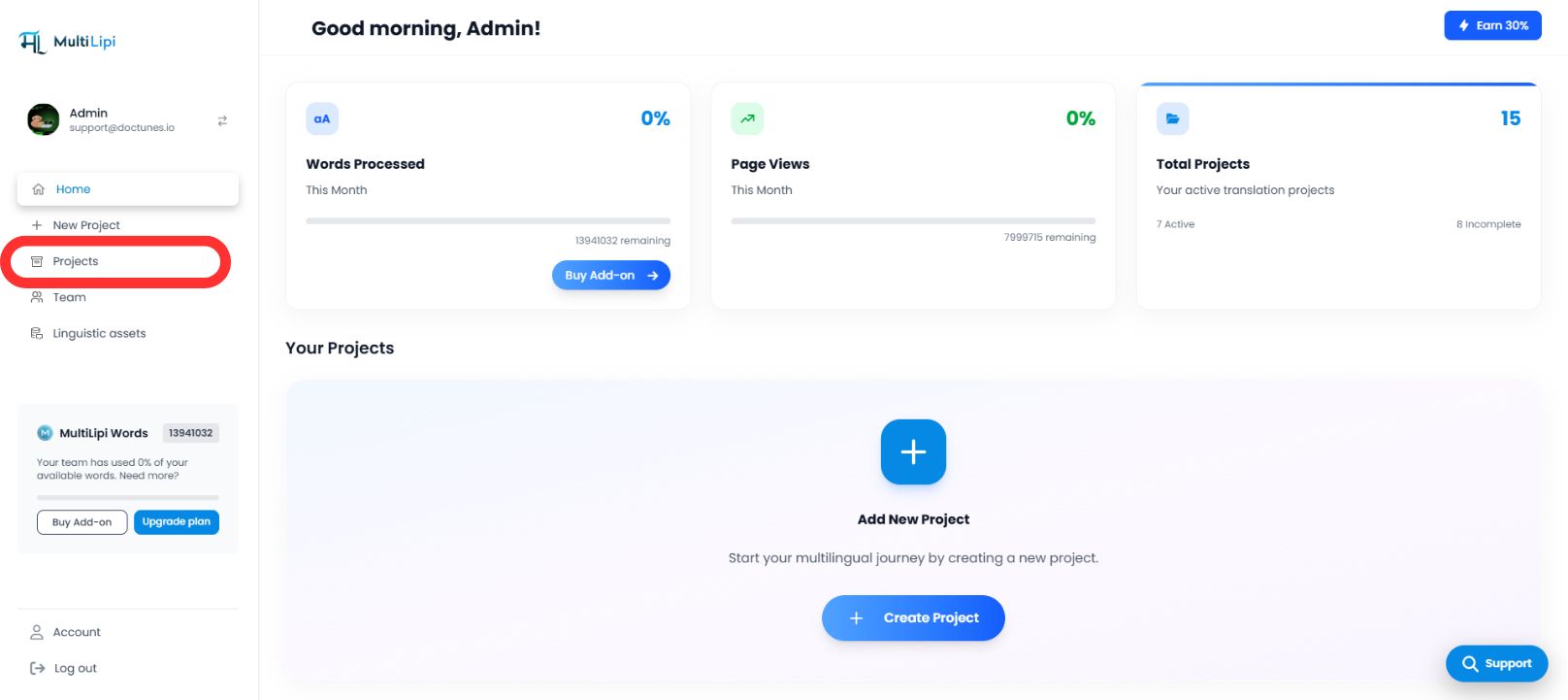
Passaggio 2: Seleziona Progetto di Destinazione
- •Individua il dominio specifico che desideri configurare.
- •Fai clic sul Riquadro del Progetto per accedere alla sua console di gestione specifica.
Passaggio 3: Accedi alla Configurazione di Setup
- •Nella barra laterale sinistra della vista del progetto, fai clic su Impostazioni.
- •Dal menu a discesa o sottomenu, seleziona Impostazioni Progetto.
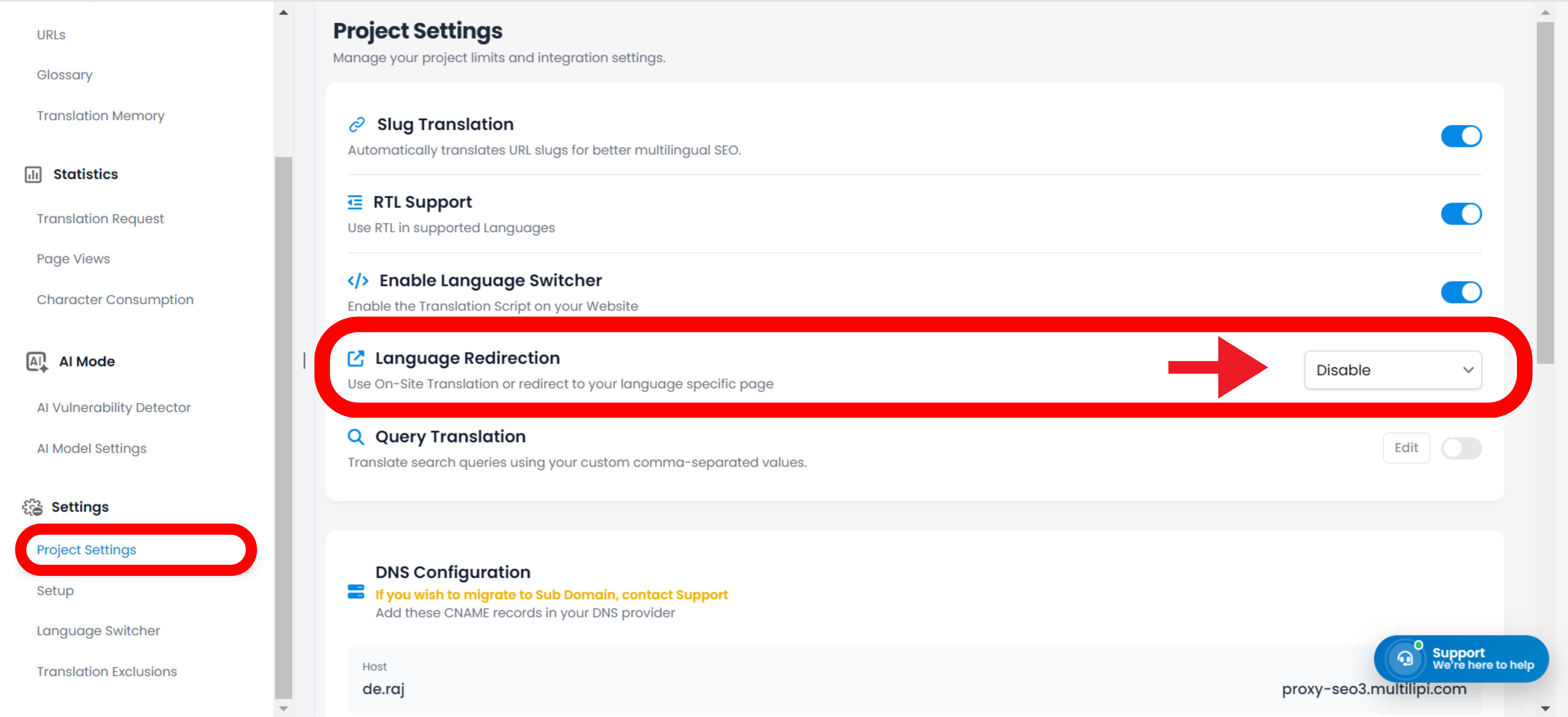
Passaggio 4: Attiva il Routing
- •Scorri verso il basso nel pannello di configurazione fino a trovare il "Reindirizzamento Lingua Visitatore" opzione.
- •Azione: Attiva l'interruttore su
ACCESO. - •Risposta del Sistema: Il routing engine è ora attivo. I nuovi visitatori verranno reindirizzati automaticamente in base alle preferenze del loro browser.
Configurazione Completata – Routing Engine Attivo
3. Benefici strategici
Perché automatizzare questo processo?
Riduzione del Bounce Rate:
Gli utenti sono meno probabile che se ne vadano immediatamente se vedono contenuti nella loro lingua madre entro il primo secondo.
Velocità di conversione:
Rimozione del "interruttore manuale" passaggio accelera il percorso dell'utente dall'atterraggio al checkout.
Fallback Intelligente:
Il sistema è non invadente; reindirizza solo se esiste una traduzione corrispondente, garantendo che nessun utente raggiunga mai un vicolo cieco.
La Conclusione:
La reindirizzamento automatico della lingua trasforma il tuo sito da un portale di traduzione passiva in un motore di localizzazione intelligente che anticipa le esigenze dell'utente prima ancora che clicchi.