
In un'infrastruttura globale, l'attrito è il nemico della conversione. Se un utente da Parigi visita il tuo sito, non dovrebbe dover cercare manualmente un'icona a forma di bandiera per passare al francese. MultiLipi Ridirettore della lingua dei visitatori agisce come un controllore del traffico intelligente. Ispeziona la richiesta in arrivo Accept-Language intestazione (località del browser) e instrada istantaneamente l'utente alla versione localizzata corrispondente del tuo sito (ad esempio, fr.yoursite.com).
Questa guida dettaglia il Protocollo di configurazione per abilitare questo livello di routing automatizzato.
1. La logica di routing
Come funziona il rilevamento.
Rilevamento:
Un utente atterra su tuosito.com.
Ispezione:
Il motore legge le impostazioni del browser (ad es. fr-FR).
Routing:
Se il francese è una lingua attiva nel tuo progetto, il sistema esegue un reindirizzamento temporaneo 302 al sottodominio francese immediatamente.
Fallback:
Se la lingua dell'utente non è supportata, rimane sulla lingua predefinita (Sorgente).
2. Protocollo di configurazione
Abilita questa funzionalità direttamente dal centro di controllo del tuo progetto.
Passo 1: Accedi al Dashboard del Progetto
- •Accedi alla tua dashboard MultiLipi.
- •Naviga nella barra laterale sinistra e fai clic su Progetti per visualizzare il tuo portfolio attivo.
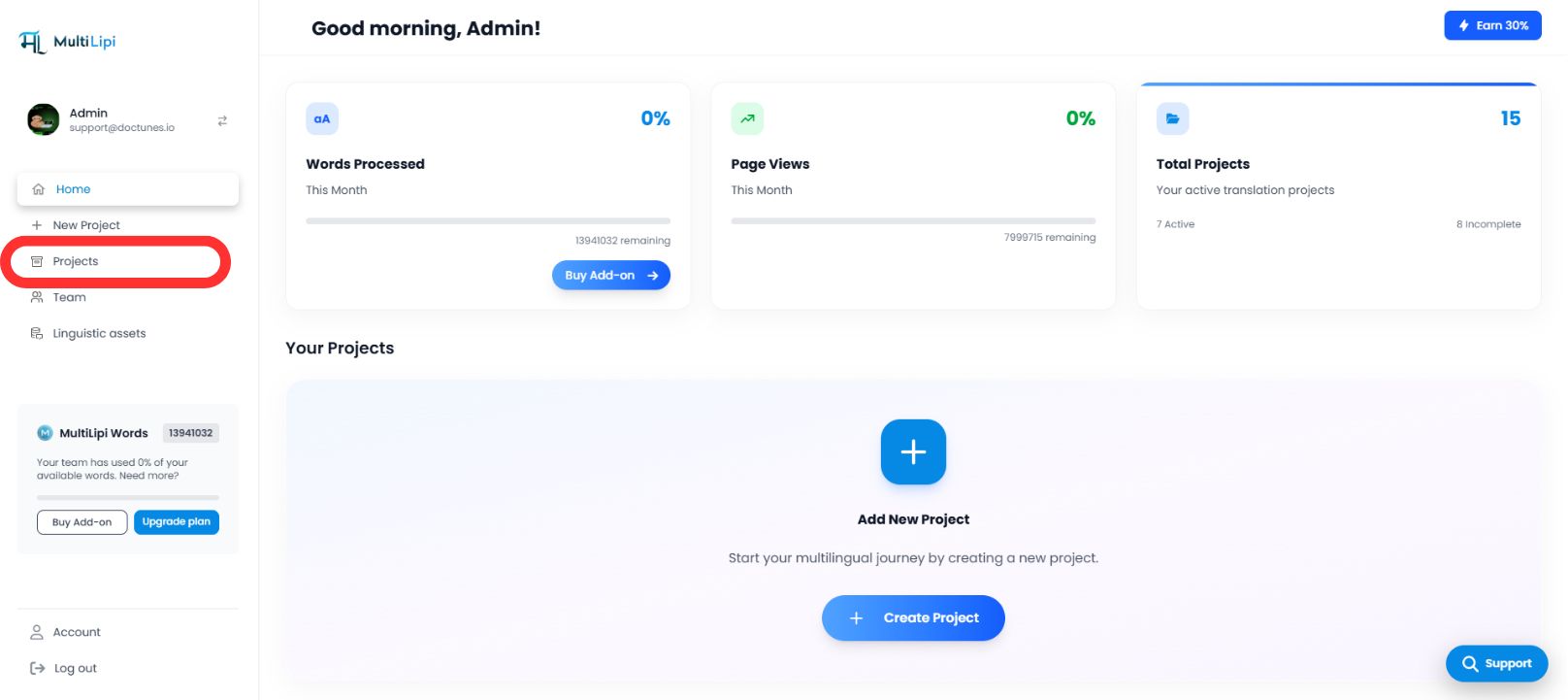
Passaggio 2: Seleziona Progetto di Destinazione
- •Individua il dominio specifico che desideri configurare.
- •Fare clic sull'icona Riquadro progetto per accedere alla sua specifica console di gestione.
Passo 3: Configurazione dell'Accesso
- •Nella barra laterale sinistra della vista del progetto, fai clic su Impostazioni.
- •Dal menu a discesa o sottomenu, seleziona Impostazioni del progetto.

Passaggio 4: Attiva Routing
- •Scorri verso il basso nel pannello di configurazione finché non trovi "Reindirizzatore Lingua Visitatore" opzione.
- •Azione: Attiva l'interruttore su
SU. - •Risposta del sistema: Il motore di routing è ora attivo. I nuovi visitatori verranno reindirizzati automaticamente in base alle preferenze del loro browser.
Configurazione completata – Motore di routing attivo
3. Benefici strategici
Perché automatizzare questo processo?
Riduzione del Bounce Rate:
Gli utenti sono meno propensi ad andarsene immediatamente se vedono contenuti nella loro lingua madre entro il primo secondo.
Velocità di conversione:
Rimozione del "interruttore manuale" il passaggio accelera il percorso dell'utente dall'atterraggio al checkout.
Fallback Intelligente:
Il sistema è non intrusivo; reindirizza solo se esiste una traduzione corrispondente, assicurando che nessun utente raggiunga mai un vicolo cieco.
In sintesi:
Il reindirizzamento automatico della lingua trasforma il tuo sito da un portale di traduzione passiva in un motore di localizzazione intelligente che anticipa le esigenze dell'utente prima ancora che faccia clic.